0%

Doxygen是一个代码文档生成工具。它从代码文件中提取注释并可生成多种文档形式。如:网页文档HTML,RTF (MS-Word),PDF等等。同时也可生成函数之间的调用和文件的依赖关系图表。

Doxygen除了支持C++语言外还支持C, Objective-C, C#, PHP, Java, Python, IDL (Corba, Microsoft, and UNO/OpenOffice flavors),甚至它也支持硬件描述语言VHDL。

doxygen的安装

  1. 使用apt安装doxygen
1
sudo apt install doxygen
阅读全文 »

你的机器人安全吗?

ROS1中的通信数据基本是开放的。只要我们知道机器的IP。然后使用下面的命令在自己的笔记本电脑里声明一下机器人系统中ROS_MASTER的地址。

1
export ROS_MASTER_URI="http://192.7.8.48:11311"

注意,这里的ip(192.7.8.48)需要设成实际机器的ip。

这样我们就可以获取机器人系统的所有通信数据。

并且很危险的是,我们可以在自己的电脑中向机器人系统发送任意速度指令或者其他指令来干扰机器人的正常运行。

想想就很不安全。

ROS2中默认集成了SROS2功能包。它可以将通信数据进行加密从而保证数据安全。下面来认识一下这个功能包。

SROS2仓库地址:https://github.com/ros2/sros2

阅读全文 »

这里记录一下使用cppcheck进行C++代码静态检测的方法和步骤。

本机安装cppcheck

1
sudo apt-get update && sudo apt-get install cppcheck

使用cppcheck来检查代码

新建一个目录,并在目录中加入如下内容的cpp文件,用于测试静态代码分析工具。

测试代码

1
2
3
4
5
6
7
8
9
10
11
12
13
14
15
16
17
18
19
20
21
22
23
24
25
26
27
28
29
30
31
32
33
34
35
#include <iostream>

using namespace std;

int test_fun()
{
int a;
return a;
}


int main(int argc, char* argv[]) {
int num = argc - 1;

int * a = nullptr; // intentional mistake
*a = 9;

if (num = 0) {
cout << "No arguments provided\n";
} else if (num == 0) { // intentional mistake
cout << "1 argument provided\n";
} else if (num == 2) {
cout << "2 arguments provided\n";
} else {
cout << num << " arguments provided\n";
}
if (argv != 0) {
cout << "argv not null\n";; // intentional extra-semicolon
}
if (argv == nullptr) {
return **argv; // intentional nullptr dereference
}

return 0;
}
阅读全文 »

什么是二次凸优化问题

可以转化成满足如下方程的优化问题被称为二次凸优化(QP)问题。

1
2
min_x 0.5 * x'Px + q'x
s.t. l <= Ax <= u

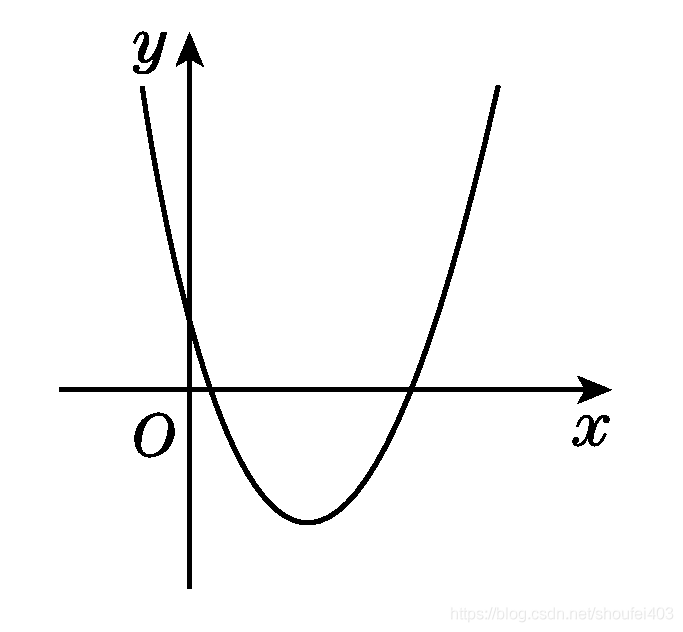
其中P是对称正定矩阵。所以目标函数的全局最小值就是其极小值。在二维的情况下,目标函数的图像类似下面的图。这里大概有一个印象就好。

约束类型可以是等式约束和不等式约束。
当需要设置等式约束时可以将需要相等的行设置为l[i] == u[i]
单侧的不等式约束,可以将最小或最大侧设置成无穷小或无穷大。

阅读全文 »

下面的一个例子演示了两个节点之间如何实现零拷贝通讯。

注意,下面测试例子的ROS2版本为Galactic

1
2
3
4
5
6
7
8
9
10
11
12
13
14
15
16
17
18
19
20
21
22
23
24
25
26
27
28
29
30
31
32
33
34
35
36
37
38
39
40
41
42
43
44
45
46
47
48
49
50
51
52
53
54
55
56
57
58
59
60
61
62
63
64
65
66
67
68
69
70
71
72
73
74
75
76
77
78
79
#include <chrono>
#include <cinttypes>
#include <cstdio>
#include <memory>
#include <string>
#include <utility>

#include "rclcpp/rclcpp.hpp"
#include "std_msgs/msg/int32.hpp"

using namespace std::chrono_literals;

// Node that produces messages.
struct Producer : public rclcpp::Node
{
Producer(const std::string & name, const std::string & output)
: Node(name, rclcpp::NodeOptions().use_intra_process_comms(true))
{
// Create a publisher on the output topic.
pub_ = this->create_publisher<std_msgs::msg::Int32>(output, 10);
std::weak_ptr<std::remove_pointer<decltype(pub_.get())>::type> captured_pub = pub_;
// Create a timer which publishes on the output topic at ~1Hz.
auto callback = [captured_pub]() -> void {
auto pub_ptr = captured_pub.lock();
if (!pub_ptr) {
return;
}
static int32_t count = 0;
std_msgs::msg::Int32::UniquePtr msg(new std_msgs::msg::Int32());
msg->data = count++;
printf(
"Published message with value: %d, and address: 0x%" PRIXPTR "\n", msg->data,
reinterpret_cast<std::uintptr_t>(msg.get()));
pub_ptr->publish(std::move(msg));
};
timer_ = this->create_wall_timer(1s, callback);
}

rclcpp::Publisher<std_msgs::msg::Int32>::SharedPtr pub_;
rclcpp::TimerBase::SharedPtr timer_;
};

// Node that consumes messages.
struct Consumer : public rclcpp::Node
{
Consumer(const std::string & name, const std::string & input)
: Node(name, rclcpp::NodeOptions().use_intra_process_comms(true))
{
// Create a subscription on the input topic which prints on receipt of new messages.
sub_ = this->create_subscription<std_msgs::msg::Int32>(
input,
10,
[](std_msgs::msg::Int32::UniquePtr msg) {
printf(
" Received message with value: %d, and address: 0x%" PRIXPTR "\n", msg->data,
reinterpret_cast<std::uintptr_t>(msg.get()));
});
}

rclcpp::Subscription<std_msgs::msg::Int32>::SharedPtr sub_;
};

int main(int argc, char * argv[])
{
setvbuf(stdout, NULL, _IONBF, BUFSIZ);
rclcpp::init(argc, argv);
rclcpp::executors::SingleThreadedExecutor executor;

auto producer = std::make_shared<Producer>("producer", "number");
auto consumer = std::make_shared<Consumer>("consumer", "number");

executor.add_node(producer);
executor.add_node(consumer);
executor.spin();

rclcpp::shutdown();

return 0;
}
阅读全文 »

C++ 标准库中的三种时钟

std::chrono::system_clock

1
2
3
4
5
6
7
8
9
10
11
12
13
14
15
16
17
18
19
20
21
22
23
24
25
26
27
28
29
30
31
32
33
34
35
36
37
38

using namespace std::chrono_literals;
const auto start = std::chrono::system_clock::now();


#include <iostream>
#include <iomanip>
#include <vector>
#include <numeric>
#include <chrono>

volatile int sink;
int main()
{
std::cout << std::fixed << std::setprecision(9) << std::left;
for (auto size = 1ull; size < 1000'000'000ull; size *= 100) {
// record start time
auto start = std::chrono::system_clock::now();
// do some work
std::vector<int> v(size, 42);
sink = std::accumulate(v.begin(), v.end(), 0u); // make sure it's a side effect
// record end time
auto end = std::chrono::system_clock::now();
std::chrono::duration<double> diff = end - start;
std::cout << "Time to fill and iterate a vector of " << std::setw(9)
<< size << " ints : " << diff.count() << " s\n";
}
}

/* 输出
Time to fill and iterate a vector of 1 ints : 0.000006568 s
Time to fill and iterate a vector of 100 ints : 0.000002854 s
Time to fill and iterate a vector of 10000 ints : 0.000116290 s
Time to fill and iterate a vector of 1000000 ints : 0.011742752 s
Time to fill and iterate a vector of 100000000 ints : 0.505534949 s
*/

//https://en.cppreference.com/w/cpp/chrono/system_clock/now

system_clock是系统范围的时钟。它是可修改的。比如同步网络时间。所以系统的时间差可能不准。

阅读全文 »

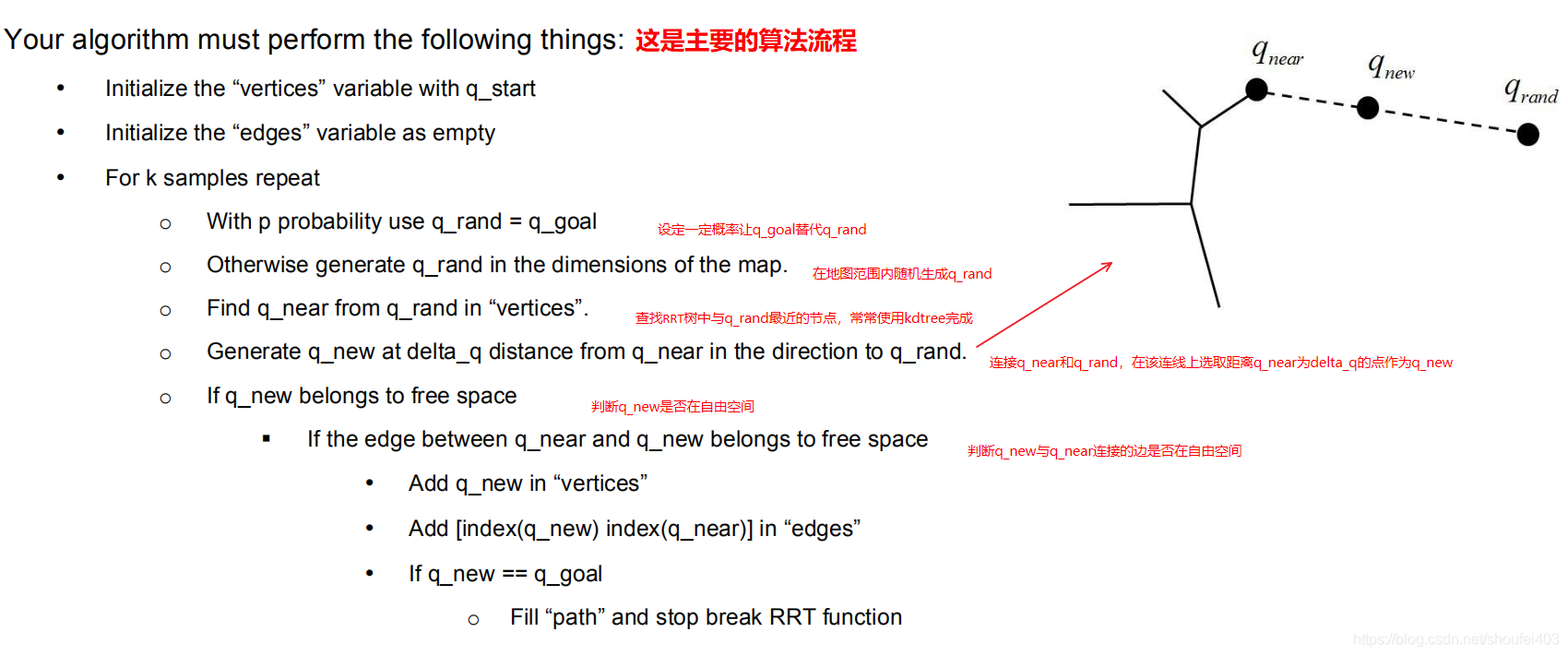
RRT与PRM一样,也是概率完备且不最优的。概率完备是指只要解存在就一定能在某一时刻找到。但解不一定是最优的。RRT与PRM相比,有一个优势就是,它在构建图的过程中就在寻找路径。

RRT的主要算法流程

在这里插入图片描述

这份基于matlab的代码很好的展示了RRT的算法流程:

https://github.com/emreozanalkan/RRT

阅读全文 »

ROS2的构建系统ament_cmake是基于CMake改进而来的。本篇文章我们详细介绍一下ament_cmake常用的语句。

一个功能包的诞生

使用ros2 pkg create <package_name>可以生成一个功能包的框架。

image-20220716195445774

一个功能包的构建信息将会包含在CMakeLists.txtpackage.xml这两个文件中。package.xml文件中包含该功能包的依赖信息,它可以帮助编译工具colcon确定多个功能包编译的顺序。当我们需要单独编译功能包时必须确保编译的包名必须与package.xml文件中的一致。

1
colcon build --packages-select <package_name>

CMakeLists.txt就是我们需要重点关注的。它描述了如何构建功能包。
阅读全文 »

下面介绍一下如何在ROS2节点中使用多线程。

使用多线程就涉及到回调组(CallbackGroup)了。

使用示例

创建回调组的函数如下:

1
2
3
4
5
6
/// Create and return a callback group.
RCLCPP_PUBLIC
rclcpp::CallbackGroup::SharedPtr
create_callback_group(
rclcpp::CallbackGroupType group_type,
bool automatically_add_to_executor_with_node = true);
阅读全文 »